
Welcome to Dr. Burn
Dr. Burn is a Telegram buy & burn bot built for Solana meme coin communities. Unlike other trading bots that keep 100% of their fees, Dr. Burn gives back. 50% of every fee is used to burn the community's own token on every single trade.
Every buy burns. Every burn is forever.
How Dr. Burn compares
| Platform | Fee | Gives Back to Community |
|---|---|---|
| 🔥 Dr. Burn | 1% | 50% burned for community |
| Trojan | 1% | 0% |
| BONKbot | 1% | Burns BONK only |
| Maestro | 1% | 0% |
| Banana Gun | 0.5% – 1% | 0% |
| Phantom in-app swap | 0.85% | 0% |
| pump.fun swap | 1% | 0% |
How It Works
Dr. Burn integrates directly into your Telegram group and handles the full buy and burn flow for community members, without requiring them to leave Telegram.
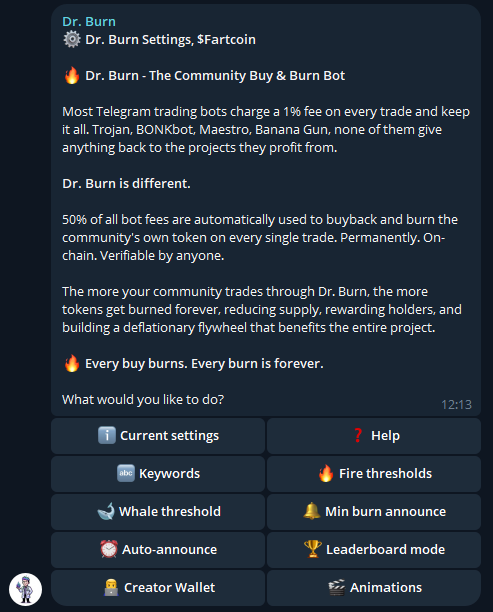
Projects displayed on screenshots are only for testing purposes and not endorsed or launched by Dr. Burn.
Bot added to your group
Admin adds @DrBurnBot to their Telegram group and grants admin permissions so it can post announcements.
Setup with /setupdrburn
Admin runs /setupdrburn and enters the token contract address. The bot fetches on-chain token details and locks permanently.
Trigger words activate the bot
When any member types a configured trigger word (ca, burn, buy, contract) the bot replies with token info and a Buy button.
User taps Buy
The checkout page opens in the browser. The user connects their Phantom or Solflare wallet and selects a SOL amount.
Transaction executes on-chain
Jupiter routes the swap for best price. 0.5% SOL goes to Dr. Burn's infrastructure. 0.5% of the output tokens are burned on-chain via a real SPL burn instruction, permanently reducing supply.
Announcement posted in group
The bot automatically posts a buy announcement with fire emojis, the amount burned, and a running total. The community sees every burn in real time.
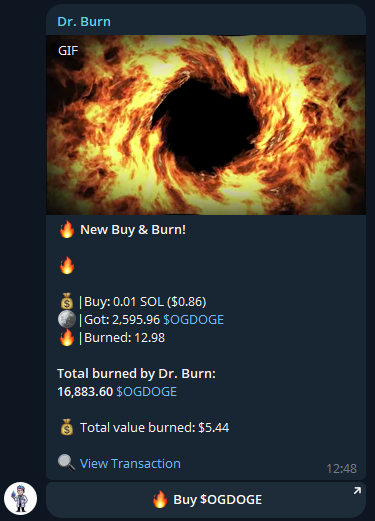
Projects displayed on screenshots are only for testing purposes and not endorsed or launched by Dr. Burn.
Getting Started
Setting up Dr. Burn for your community takes less than two minutes.
Add @DrBurnBot to your Telegram group
Search for @DrBurnBot in Telegram or use the button at the top of this page.
Make the bot an admin
Go to your group settings, find Dr. Burn in the members list, and promote it to admin. The bot needs permission to send messages and media so it can post announcements and GIFs.
Run /setupdrburn as group admin or owner
Only group admins and owners can run /setupdrburn. The command will not work for regular members.
Send your token's contract address
The bot will prompt you for your Solana token CA. Paste the contract address and the bot fetches the on-chain details automatically.
Bot confirms and locks
The bot displays the token name, symbol, and details for you to confirm. Once confirmed, the contract address is permanently locked for that group. It cannot be changed afterward.
Share with your community
Pin the bot's first message or type a trigger word yourself to show the community the Buy button. You're live.
Projects displayed on screenshots are only for testing purposes and not endorsed or launched by Dr. Burn.
Requirements
| Requirement | Details |
|---|---|
| Graduated Solana token | Any token that has fully launched on-chain is supported, including all pump.fun tokens that have graduated. Token 2022 standard fully supported. |
| Group admin or owner | You must be an admin or owner to run /setupdrburn and access the settings menu. |
| Bot admin permissions | Dr. Burn must be promoted to admin in your group to post announcements and media. |
Commands
All commands are used directly in your Telegram group chat. Admin-only commands are marked.
Settings
Settings are accessed via the interactive button menu. Run /settingsdrburn (or /setupdrburn on an already-configured group) to open the settings panel. As a group admin, tap any of the settings buttons in Telegram to configure your group. All options are presented as button menus — no commands to memorize.
Leaderboard
Dr. Burn tracks every on-chain burn and ranks community members by the total amount of tokens they have burned. Leaderboard entries update in real time after every successful buy.
| Leaderboard Type | Resets | Auto-posts |
|---|---|---|
| Daily | Midnight UTC every day | Midnight UTC (if activity that day) |
| Weekly | Every Monday | Sunday 22:00 UTC |
| All-time | Never | Included in Sunday recap |
Creator Wallet
The Creator Wallet feature lets admins register up to 3 developer or creator wallets. Dr. Burn continuously monitors these wallets for burn activity and automatically announces them to the group.
What gets tracked
| Event | Tracked |
|---|---|
| Real SPL burns (createBurnInstruction) | Yes |
| Burns to the Solana incinerator address | Yes |
| Historical burns on registration | Yes (full history scanned) |
| Burns from other wallets | Not tracked |
Dev Burn tab
The checkout page includes a separate Dev Burn tab where developers can burn tokens they hold directly. This is distinct from community buys.
The /devburn command
Running /devburn in your group shows:
- Total tokens burned by all registered creator wallets, all time
- The last 3 burn transactions with Solscan links
- USD value of each burn at the current token price
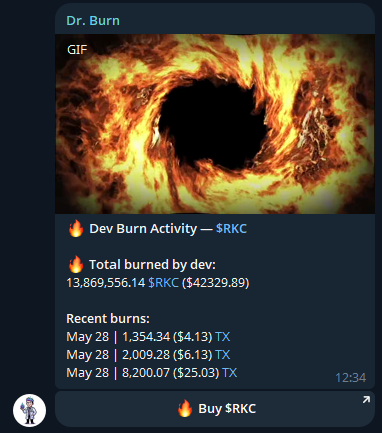
Projects displayed on screenshots are only for testing purposes and not endorsed or launched by Dr. Burn.
Animations
Every buy announcement and dev burn announcement can include a custom animated GIF or short video to make burns more exciting in your group chat.
| Animation Type | Used When | Default |
|---|---|---|
| Buy & Burn animation | A community member buys through Dr. Burn | Dr. Burn fire animation |
| Dev Burn animation | A registered creator wallet burns tokens | Dr. Burn fire animation |
How to set a custom animation
Open the settings menu
Tap the settings button in any Dr. Burn reply as an admin and select the Animations option.
Choose the animation type
Select either Buy & Burn animation or Dev Burn animation.
Send your GIF
When prompted, send any GIF directly in the chat. The bot saves it immediately and uses it for all future announcements of that type.
Fee Structure
Dr. Burn charges a total of 1% on every community buy. Half of that 1% flows straight back to your community as a permanent on-chain token burn. The platform is fully non-custodial at every step.
Community Buy Transaction
Dev Burn Transaction
The Dev Burn tab on the checkout page lets developers burn tokens directly from their wallet, announced automatically in the group. A small platform fee keeps the Dr. Burn infrastructure running so the community benefit continues.
How does this compare?
Dr. Burn's 1% buy fee is in line with other Telegram trading bots, but with one key difference: half of it is burned directly as your community's token on every single trade.
| Platform | Swap Fee | Burns your token? | Notes |
|---|---|---|---|
| Dr. Burn | 1% | Yes, 0.5% every buy | 50% of fee burned as community token on-chain |
| Trojan Bot | 1% | No | Fee kept by platform |
| Banana Gun | 0.5% – 1% | No | Fee kept by platform |
| Maestro | 1% | No | Fee kept by platform |
| Phantom in-app swap | 0.85% | No | Fee kept by Phantom, no community benefit |
| pump.fun swap | 1% | No | Fee kept by pump.fun |
| sol-incinerator.com | 2% of tokens | Burns, but costs more | 2% platform fee to burn, no swap included |
Frequently Asked Questions
🤖 Bot: @DrBurnBot
💬 Support: @DrBurnSupport
🌐 Ecosystem: @DrBurnEcosystem
🌍 drburnsolana.com
🐦 Twitter: @DrBurnBot
Dr. Burn is a neutral, non-custodial infrastructure tool. The following are absolute rules that apply to the Dr. Burn team, bot, and any official communications:
- Dr. Burn will never launch a coin, token, or any tradeable asset. Any token, presale, or NFT claiming to be associated with Dr. Burn is a scam. Do not interact with it.
- Dr. Burn will never ask for your private key or seed phrase — ever, under any circumstances. Anyone who does is impersonating us. Report and block immediately.
- Dr. Burn team members will never DM you on Telegram first. We do not initiate private conversations to offer help, promotions, partnerships, or anything else. If someone contacts you claiming to be from Dr. Burn, it is a scam.
- We will never ask you to send SOL, USDC, or any token to any wallet. Dr. Burn does not have a "whitelist payment", "early access fee", "gas deposit", or any other reason to receive funds directly from you.
- We will never ask you to click a link sent in a private Telegram message. All official links are on this website and in the verified bot only.
- We will never offer "guaranteed returns", "token airdrops", or "exclusive investment opportunities." These are all social engineering tactics used by scammers impersonating the Dr. Burn brand.
- We will never ask for access to your Telegram account, wallet app, or any device. Do not share screen access, verification codes, or login credentials with anyone claiming to represent Dr. Burn.
- The only official Dr. Burn Telegram bot is @DrBurnBot. Any other bot with a similar name is not affiliated with us.
- The only official website is drburnsolana.com. Be cautious of lookalike domains.
If something feels off, trust your instincts. When in doubt, do not interact — and always verify through the official channels listed on this page.
Official Channels
Only trust communications from the verified channels below. Anyone else claiming to represent Dr. Burn is an impersonator.
⚠️ Safety reminder
- Our team never DMs first on Telegram
- We never ask for funds, seed phrases, or private keys
- Dr. Burn has no plans to launch a token — ever
- Any token, presale, or airdrop claiming to be Dr. Burn is a scam
VERIFY BEFORE YOU TRUST. 🔒
Terms of Service
Last updated: May 2026
1. Acceptance
By using Dr. Burn you accept these terms in full. If you do not agree, do not use the service.
2. No Financial Advice
Nothing on Dr. Burn constitutes financial advice, investment advice, or a recommendation to buy or sell any asset. Cryptocurrency trading involves substantial risk of loss. Never trade more than you can afford to lose.
3. No Warranty
Dr. Burn is provided "as is" without any warranty of any kind, express or implied. We do not guarantee uninterrupted service, accurate pricing, successful transactions, or the accuracy of any on-chain data displayed.
4. Limitation of Liability
Dr. Burn and its operators are not liable for any losses, damages, or costs arising from your use of the service, including but not limited to: failed transactions, incorrect token amounts, network congestion, smart contract bugs, oracle failures, or market volatility. Your use of the service is entirely at your own risk.
5. Non-Custodial
Dr. Burn never holds, stores, or controls user funds at any point. All transactions are initiated and signed by the user in their own self-custody wallet. You are solely responsible for the security of your wallet, seed phrase, and private keys. Dr. Burn has no ability to recover lost funds or reverse transactions.
6. No Guarantees on Burns
Token burns are permanent and irreversible by design. Dr. Burn does not guarantee any financial benefit, price appreciation, or supply reduction outcome from burning tokens. Past burn activity is not indicative of future results.
7. Changes to Terms
We reserve the right to modify these terms at any time without prior notice. Continued use of the service after changes constitutes acceptance of the updated terms.
8. Contact
For questions or concerns: t.me/DrBurnBot